Salesforce Sales Cloud is a comprehensive CRM (Customer Relationship Management) platform designed to help sales professionals manage their entire sales process more efficiently.

Course Content
Module 1: Learn About, Implement, and Optimize Sales Cloud Features
Sales Cloud provides everything for the sales side of your business. Get started configuring Salesforce so your sales teams can generate the best leads, manage opportunities through the sales pipeline, and cultivate relationships with accounts. Plus, help your sales leaders forecast incoming revenue and manage sales territories.
- Explore Capabilities & Use Cases
- Gauge Implementation Readiness
Module 2: See an Overview of Metrics, Goals, Suggestions, Tasks, and Activities in Seller Home
Sales team members can start their day with a bird’s eye view of their business. Seller Home shows users an overview of their opportunities, accounts, leads, and contacts, along with their day’s agenda. Seller Home also lets users set goals and track progress and view their to-do items, recent records, and contact suggestions from Einstein.
With useful information available at a glance, sales reps can get oriented faster and choose what to do next. Seller Home includes:
- The Opportunity overview
- Account overview
- Lead overview
- Contact overview
- Weekly or monthly goals
- Today’s Events • To-do items • Recent Records
- Contact suggestions—identified by Einstein from a user’s emails and events
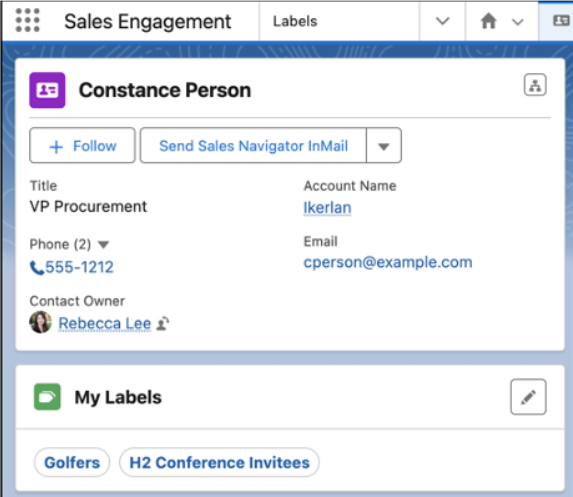
Module 3: Organize and Find Records Easily with Personal Labels
Apply your own labels to records to help you organize, track, and find the records you need quickly and easily. Add labels to records related to a region, project, campaign, or anything else that helps keep work organized. Labels that you add to records are separate from labels added to To Do List items.
Module 4: Capture ROI with Campaigns
Organize and track your marketing efforts with Salesforce campaigns. When you align your campaign structure to your business processes and strategies, you can report ongoing marketing performance and ROI across activities and segments:
- Get to Know Salesforce Campaigns
- Set Up Campaigns in Salesforce
- Manage Campaign Members
- Connect Account Engagement and Salesforce Campaigns
- Leads
Bonus Module 1: CV Kick-Off / Interview
- CV – Templates Review, Business Process Sample Documents
- Open Discussion
- Other Websites (Trello, Monday.com & Microsoft Planner etc.) or Trailhead Practice
- Create a Career Plan and Skill Up in Salesforce
Module 5: Turn Opportunities into Deals
Move opportunities through the sales process, and track exactly what you’re selling and for how much.
- Products and Price Books
- Opportunities
- Quotes
- Contracts
- Orders
Module 6: Manage Accounts and Contacts
Track the people and companies you do business with. Store information, collaborate on accounts, access the records you need.
- Accounts.
- Contacts
- Case studies based on real-world scenarios.
- Q&A sessions and discussions.
Module 7: Manage a Sales Team
Track the people and companies you do business with. Store information, collaborate on accounts, access the records you need.
- Revenue Intelligence.
- Pipeline Inspection
Bonus Module 2: AppExchange Exploration
Overview of Salesforce AppExchange (Session)
- Navigate the AppExchange to discover and evaluate potential solutions
- Identify apps that address specific business needs and challenges
- Install, configure, and integrate AppExchange solutions with your Salesforce instance
Module 8: Artificial Intelligence and Sales Cloud
AI makes the sales process smarter at every step. Salesfore’s AI technology—Einstein—automates data entry and predictive analysis so you can make every selling moment count.
- Einstein Features in Sales Cloud.
- Einstein and Data Usage in Sales Cloud
- Set Up Einstein Opportunity Scoring for Sales Cloud Users
- Manage Sales Cloud Users’ Access to Einstein Features
- Einstein Copilot for Sales Setup
Final Discussions – Q&A – More Sales Features
- Evaluation of understanding through a final assessment.
- Certification for successful completion.
Additional Considerations
- Salesforce Trailhead: https://trailhead.salesforce.com/
- Sales Cloud Reference Guide > Link
- Kam’s Tech Talk: https://www.youtube.com/@ksm1313live
- Your Journey from Salesforce Associate to Administrator 2024 https://ksm1313live.wordpress.com/2024/02/10/your-journey-from-salesforce-associate-to-administrator-2024/
- Salesforce Ben Practice Exams: https://www.salesforceben.com/get-salesforce-certified/
- Prepare for Your Salesforce Sales Cloud Consultant Credential: https://trailhead.salesforce.com/users/strailhead/trailmixes/prepare-for-your-salesforce-sales-cloud-consultant-credential
Tips for Success:
- Start with Trailhead: Trailhead is a free, interactive learning platform from Salesforce. It offers a variety of modules and trails specifically designed for the Associate certification.
- Practice with mock exams: Take advantage of free and paid practice exams to familiarize yourself with the exam format and identify areas for improvement.
- Join the Trailblazer Community: Connect with other learners and experts in the Salesforce community for support and guidance.
- Review the exam guide: Read and understand the official Salesforce Associate Certification exam guide for detailed information on the exam content.
- Focus on your weak areas: Identify the topics you struggle with and spend more time studying those areas.
Instructor-Led Sessions: Conduct instructor-led sessions for theoretical concepts.
Hands-on Workshops: Include hands-on workshops for practical application.
Group Activities: Foster collaboration through group activities and discussions.
Feedback Sessions: Regular feedback sessions to address participant questions and concerns.
Online Resources: Provide access to online resources for continuous learning.
Disclaimer: This course material is intended for informational purposes only and does not guarantee success on the Salesforce Associate Certification exam. Please refer to the official Salesforce website for the latest exam information and resources.
I hope this course material helps you prepare for your Salesforce Associate exam!
 Kam's Tech Talk - Learn. Connect. Thrive.